QR Code Scams: What a Fake Parking Code Really Does
You park, walk to the meter, and there's a neat sticker: "Scan to pay." You scan, type your card number, and get on with your day. In August 2026, police in New Westminster, British Columbia, said people who did exactly that later found large withdrawals from their bank accounts. One lost $2,000.
That's the most common shape of QR code scams: a sticker that sends your phone to a lookalike payment page. The fix is simple once you see how it works. Check whether the parking operator uses QR codes at all, read the link before you tap it, and pay through the official app or the meter itself.
Below: what's inside the sticker, what the fake page does with your card, three checks that catch it, the email and package versions of the same trick, and what to do in the first hour if you already paid.
A QR code is plain text you can't read
A QR code is a container for text. Usually that text is a web address. Denso Wave, the company that invented the format, lists the capacity at up to 2,953 bytes of binary data, which is plenty for a long URL and not much else.
Your phone's camera reads the pattern and shows you the text. That's it. Nothing in the pattern says who printed it, and nothing proves the city made it.
Try it yourself. Paste any address into CyberScryb's free QR code generator and you'll have a printable code in about ten seconds, no account needed. That convenience is the whole problem. A scammer doesn't hack the meter. They make a code, print it on sticker paper, and press it on.
One nerdy detail is worth knowing. QR codes carry error correction: at the highest level, Denso Wave says about 30% of the data can be restored if the code is dirty or damaged. So a scuffed code still works, and a polished one proves nothing. A styled, official-looking code is as easy to make as a plain one.
So what happens after the scan?
What a fake parking QR code does, step by step
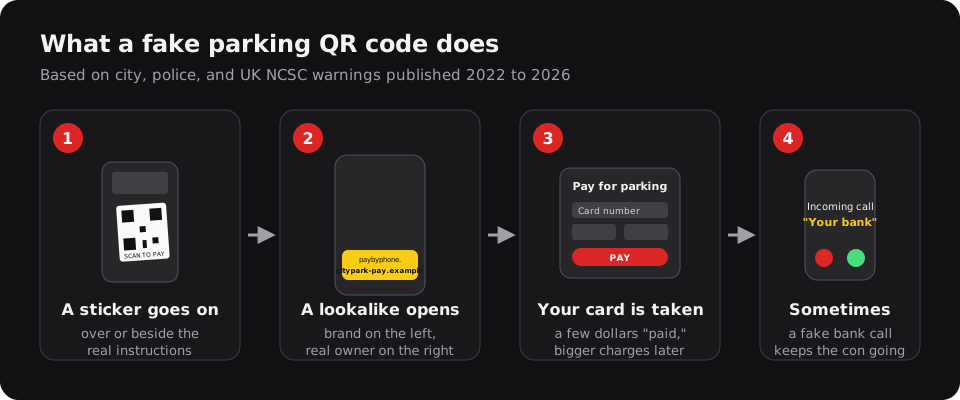
Real cases from city and police warnings follow the same four steps.
1. The sticker goes up. In January 2022, Austin found fraudulent QR stickers on more than two dozen parking pay stations, and police opened an investigation. In June 2025, New York City's transportation department warned about a sticker on the side of a ParkNYC meter. In York, England, scammers spent the summer of 2025 putting codes on signs and ticket machines at at least eight city car parks, some carrying the PayByPhone logo. PayByPhone doesn't use QR codes for car park payments.
2. Your phone opens a lookalike. York's fake codes led to a counterfeit site built to resemble the real PayByPhone platform. The FBI notes these addresses are often close to the real one, with a typo or a misplaced letter.
3. The page takes your card. You think you're paying $3 for an hour. You're handing a stranger your card number. York's anti-fraud team heard from people who lost up to £400. In New Westminster, the losses showed up later as withdrawals from bank accounts. Auckland police put it bluntly in September 2026: if you scan one of these codes, there's "a high chance" the site is run by an offshore scam centre.
4. Sometimes, a follow-up call. The UK's National Cyber Security Centre describes a case where, after the QR step, criminals phoned the victim posing as bank staff to keep the con going. If "your bank" calls right after a strange parking payment, that call may be part of the same scam.
Why QR code scams target parking first
The NCSC makes a point worth keeping in proportion: QR fraud is "relatively small" next to other cyber fraud, and most of it happens in open spaces like stations and car parks.
Parking fits the scam almost perfectly. You expect to pay. You're standing outside, often in a hurry. The meter is unattended, so nobody notices a new sticker for days. And a few dollars doesn't feel like a risky purchase, so your guard is down at exactly the moment you type a full card number.
That's also why you don't need to fear every QR code. The NCSC says restaurant and pub codes are "probably safe." A good rule: relax when a code shows you a menu, and get strict the moment a code asks for money or a password.
Getting strict takes about ten seconds, using three checks.
Three checks that catch a fake QR code
Check 1: Does this operator use QR codes at all?
This one catches the most fakes, because many parking systems don't use QR codes for payment. Auckland Transport says it doesn't use them on any of its parking machines. New Westminster says the city doesn't use QR codes as a payment method, and that the real payment options are printed on the signs above or on the meter. In New York, the city says the only ways to pay at a meter are the ParkNYC app or the meter itself.
Some places do use them in narrow ways. Raleigh, North Carolina, says it uses QR codes for parking only on violations and garage tickets, and tells drivers not to scan codes on street meters.
So read the official sign, not the sticker. If the sign names an app, open that app from your phone's app store. Better yet, install your city's parking app before you need it.
Check 2: Read the link before you tap it
Your camera shows the link first. On iPhone, Apple's instructions are to tap the link that appears at the bottom of the screen. That pause is your chance.
Look at the domain, the part between https:// and the first single /. Then read it from the right. In paybyphone.citypark-pay.example/meter, the brand name sits on the left, but the site belongs to citypark-pay.example. Whoever registered that name controls the page. The FTC's advice is the same: look for misspellings or a switched letter.
Not sure? Copy the address into CyberScryb's Is This Link Safe? checker. It breaks the URL apart, flags lookalike hosts, brand names hiding in subdomains, and shorteners, and it never opens the link. It's a heuristic, not a guarantee, so treat a warning as a reason to walk away.
Check 3: Touch the sticker
The FBI's advice is to check whether the code has been tampered with, such as a sticker placed on top of the original. Run a thumb over it. Raised edges, a slightly different shade of white, or a code that sits off-center on a printed panel are all bad signs. A code on a meter that is otherwise covered in official, printed instructions deserves suspicion.
While you're at it, two more FBI rules: don't download an app from a QR code (use your phone's app store), and don't install a separate QR scanner app. Your camera already does the job.
If you want to practice spotting these, the Would You Click It? quiz includes a fake parking-refund poster among its traps.
The parking lot is only one place these codes show up. The other big one is your inbox.
Quishing: the same trick in your email
"Quishing" is QR code phishing: a scam email with a code instead of a link. It sounds like a gimmick until you see why it works. The NCSC lists three reasons. People have learned to distrust strange links. Not every email filter scans images, so a code can slip through. And you scan it with your personal phone, which may not have the protections of a work computer.
The volume got big fast. Microsoft says that at the height of a QR phishing surge, its email security was blocking 3 million attempts a day, falling to about 200,000 a day after it added better QR scanning. The lures were things like password resets, two-factor prompts, and document signing.
In July 2025, the security firm Arctic Wolf described a campaign of spoofed messages that looked like internal voicemail notifications, with PDFs carrying phishing QR codes.
The rule here is blunt. A real service never needs you to sign in by scanning a code from an email. If a message says your password expires or a document awaits your signature, type the service's address yourself and check there.
The package with a QR code and no sender
There's a newer twist. You get a package you didn't order, with no return address and a note: scan to find out who sent it, or how to return it.
The FTC warned about this in January 2025, and the FBI followed in July 2025 with an alert on unsolicited packages containing QR codes. The code can lead to a phishing site or push malware. The FBI also says it's "not as widespread as other fraud schemes," so no need to panic about every box.
Don't scan it. And the good news, per the FTC: the law says you can keep the item as a gift.
Already paid through a fake code? Do this in the next hour
Mistakes happen, especially in the rain with a parking officer two cars away. Speed matters more than anything else.
- Call your card issuer. Use the number on the back of your card, not one from a text, email, or caller. Tell them you entered your card on a fraudulent site and ask them to block the card and dispute the charges.
- Know which card you used. For credit cards, federal law limits your liability for unauthorized charges to $50, and written disputes must reach the issuer within 60 days of the first bill with the error. Debit cards pull from your actual bank balance. The CFPB says to notify your bank right away, and no later than 60 days after the statement showing the charge, or you could be stuck with later losses.
- Change any password you typed. If the page asked you to log in, change that password and turn on two-factor authentication, as the FTC advises.
- Be wary of "your bank" calling you. Hang up and call the number on your card. The NCSC's case shows scammers follow up by phone.
- Report it. Tell the parking operator so they can sweep their meters. NYC tells people to tear the sticker off and report the location. In the US, file reports at ic3.gov and ReportFraud.ftc.gov. Take a photo of the sticker first; it helps.
FAQ
Can scanning a QR code hack my phone?
Scanning decodes text and shows you a link; on iPhone you then tap the link to open it. The risks the FBI and FTC describe come after that: the site you open, what you type into it, and anything you install from it. Read the link, and don't install apps from QR codes.
Are restaurant QR codes safe?
Usually. The UK's NCSC says codes in pubs and restaurants are "probably safe." Be stricter with codes in public spaces like car parks and stations, and with any code that asks for payment or a login.
What is quishing?
QR code phishing. Instead of a clickable link, a scam email or letter carries a QR code, which can slip past filters that don't scan images and gets opened on your phone instead of a protected computer.
The code can't vouch for itself
A QR code is a sealed envelope with an address inside, and anyone can print one. The sign on the pole, the official app, and the domain on your screen can tell you who you're paying. The sticker can't.
Do one thing today: install the official parking app for the city you drive in most, so the next "Scan to pay" sticker is easy to ignore.